
15
Des
OpenShot 3.4 gefið út | Bætt frammistaða, ný áhrif, spennandi uppfærslur!
Ritað af á í Útgáfur .
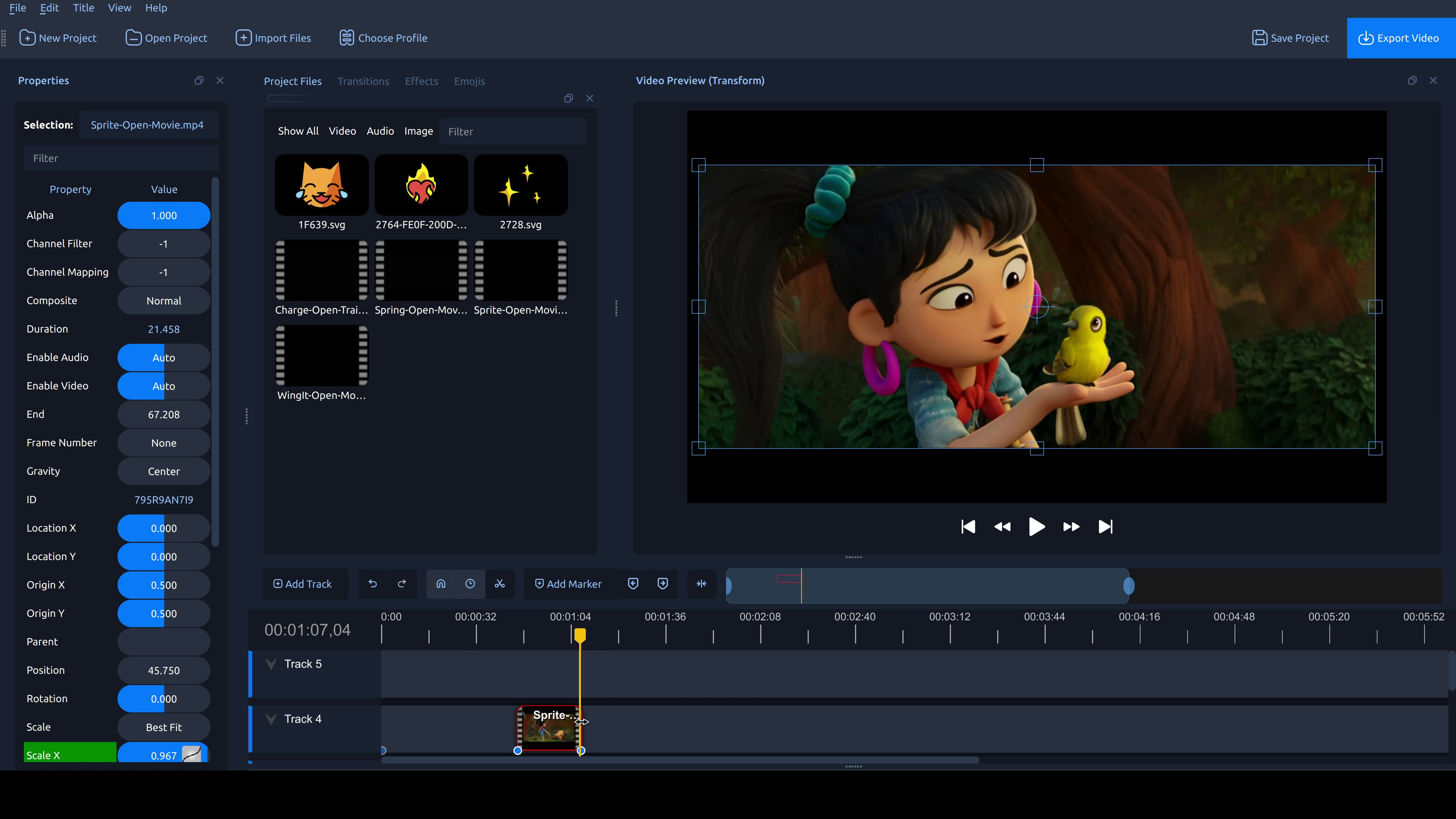
Förum af stað! OpenShot 3.4 er komið, og þetta er ein af stærstu uppfærslum sem við höfum gert. Alls 32% hraðari frammistaða, minni minni-notkun, mörg ný vídeóáhrif og eiginleikar, mörg villur og hnökrar lagaðir, og tilraunatímalína fyrir þá sem eru nógu hugrakkir til að prófa framtíð OpenShot! Sæktu OpenShot 3.2.1 núna!
Þessi færsla er aðeins í boði á ensku.
Top highlights
- Big speed-up across the board: ~32% faster overall in internal benchmarks (197,011 → 133,239 “lower is better”).
- New Effects:
- Sharpen (detail enhancement; includes High Pass mode)
- Color Map (LUT) (color grading via
.cubeLUT files; supports 1D & 3D LUTs) - Spherical Projection (flatten/convert 360°/180° footage; fisheye options + improved quality)
- Lens Flare (classic flare look; based on FlareFX-style filter)
- Outline (edge/line styling with improved antialiasing)
Performance improvements
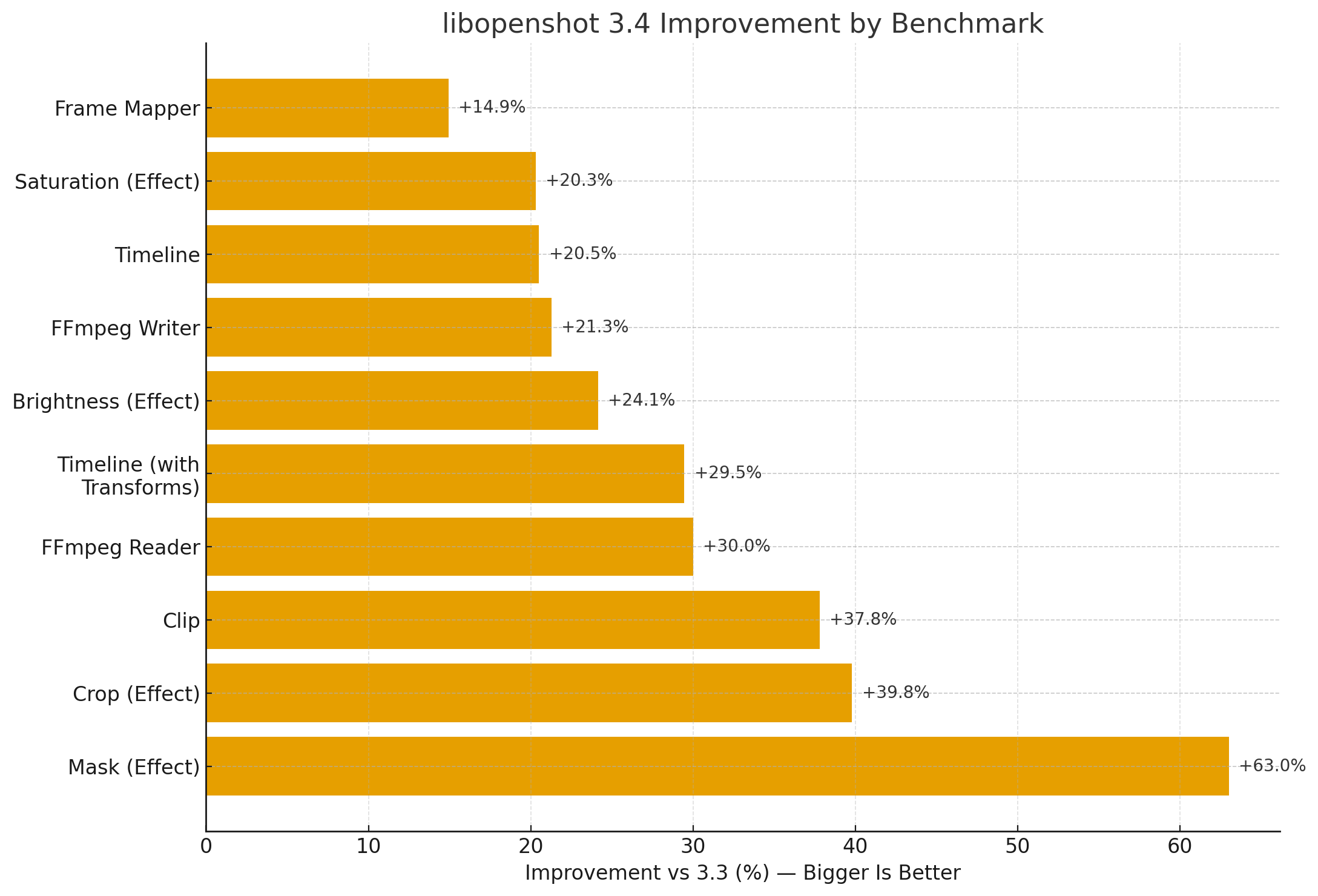
- Faster libopenshot core (benchmarks vs prior release; bigger is better):
- Mask effect: +63%
- Crop effect: +39.8%
- Clip rendering: +37.8%
- FFmpeg Reader: +30.0%
- Timeline (with transforms): +29.5%
- Brightness: +24.1%
- FFmpeg Writer: +21.3%
- Timeline: +20.5%
- Saturation: +20.3%
- Frame Mapper: +14.9%
- Faster exports (~23% improvement) by integrating the caching thread into the Export dialog (reduces CPU contention and improves throughput).
- Faster waveforms for long audio + time-curved clips (less decoding work; better handling during timeline edits).
- Faster FFmpeg decoding (aligned buffers / SIMD-friendly handling).
Cropping (interactive)
Demo: Interactive cropping in the preview!
- Interactive Crop handles in the video preview (crop what you see, directly on the canvas).
- Crop context menu + improved crop/transform handle synchronization (better origin handling, fewer surprises when resizing).
Timing Mode (drag to re-time)
- Timing toggle button (re-time by dragging clip edges, similar to trimming).
- More consistent frame-accurate behavior while re-timing (project FPS precision).
Keyframes & snapping
Demo: Dragging keyframes is now super easy!
- Draggable keyframes on the timeline (with live preview while dragging).
- Snapping improvements:
- Keyframes participate in snapping targets (especially during trims)
- Better snap tolerance during trims/re-timing
- Avoid “snap to self” edge cases (prevents odd lock-ups)
Experimental Timeline (Preferences → Experimental)
Demo: The Experimental Timeline in action!
Experimental Timeline can be enabled in Preferences → Experimental. It’s the bleeding-edge direction of OpenShot’s timeline and may still have rough edges.
Unstable / use at your own risk.
- Smoother scrolling/zooming on large timelines (reduced geometry rebuilds).
- Markers, waveforms, keyframe rendering, improved snapping, and more track visuals.
- Thumbnail handling improvements for trimming and preview reliability.
- New Keyframe panel and in-timeline keyframe editing
Editing & workflow
- Repeat / Loop / Ping-Pong options added to the Time context menu (supports trims + Timing mode).
- Multi-selection editing improvements:
- Transform multiple clips together (location/scale/rotation/skew, etc.)
- Property dock supports multi-select navigation (jump between selected items cleanly)
- Copy/Paste files into Project Files from the OS clipboard (assets auto-saved into the project asset folder).
Import / Export compatibility
- Final Cut Pro XML (v4/v5 xmeml) improvements:
- Better spec compliance (DTD support; cleaned up nonstandard attributes)
- Improved import order (video tracks first, audio tracks after)
- Motion + keyframes round-trip (trim, alpha, volume, position, scale, rotation — with some limitations)
- EDL import/export improved (more standards-friendly, plus OpenShot details as comments).
- Timecode alignment updated to match common standards (00:00:00:00 framing behavior).
Media handling & accuracy
- Duration strategy modes in FFmpegReader (more consistent handling across tricky media).
- Stronger consistency between frame counts and durations (duration and
video_lengthnow match in meaning; unknown durations handled more predictably). - Animated GIF import via FFmpeg (supports animation + alpha; fixes duration/video_length accuracy).
- Better H.265 playback on Apple devices (adds
hvc1tagging where needed). - Audio direction fixes for reversed/time-curved clips (more reliable audio when time runs backward or changes direction).
Developer tools
- New Benchmark tool in libopenshot (easier performance testing and version comparisons).
Stability & reliability
- Undo/Redo reliability fixes (transaction grouping survives save/reload; fewer selection-related crashes).
- Crash prevention in common editing actions (deleting tracks/transitions, “Save Frame As…”, waveform extraction edge cases).
Packaging & platform support
- AppImage improvements to work better on newer distros (dependency fixes and environment hardening for modern Linux systems).
- Ongoing cross-platform maintenance across Linux/macOS/Windows (build and compatibility updates).
Infrastructure & automations
- SQS-based autoscaling build infrastructure (builders run only when needed; reduces ongoing infrastructure cost).
- Additional CI/release automation improvements (more reliable asset handling and deployment flow).
Credits, translations, and community
- Updated supporter credits and acknowledgements.
- Translation updates (many languages refreshed; more completed translations).
- Special thanks to Raffi for community support, testing, issue advocacy, and helping drive quality forward.