
15
Gru
OpenShot 3.4 Wydany | Poprawiona Wydajność, Nowe Efekty, Ekscytujące Aktualizacje!
Napisane przez dnia w Wydania .
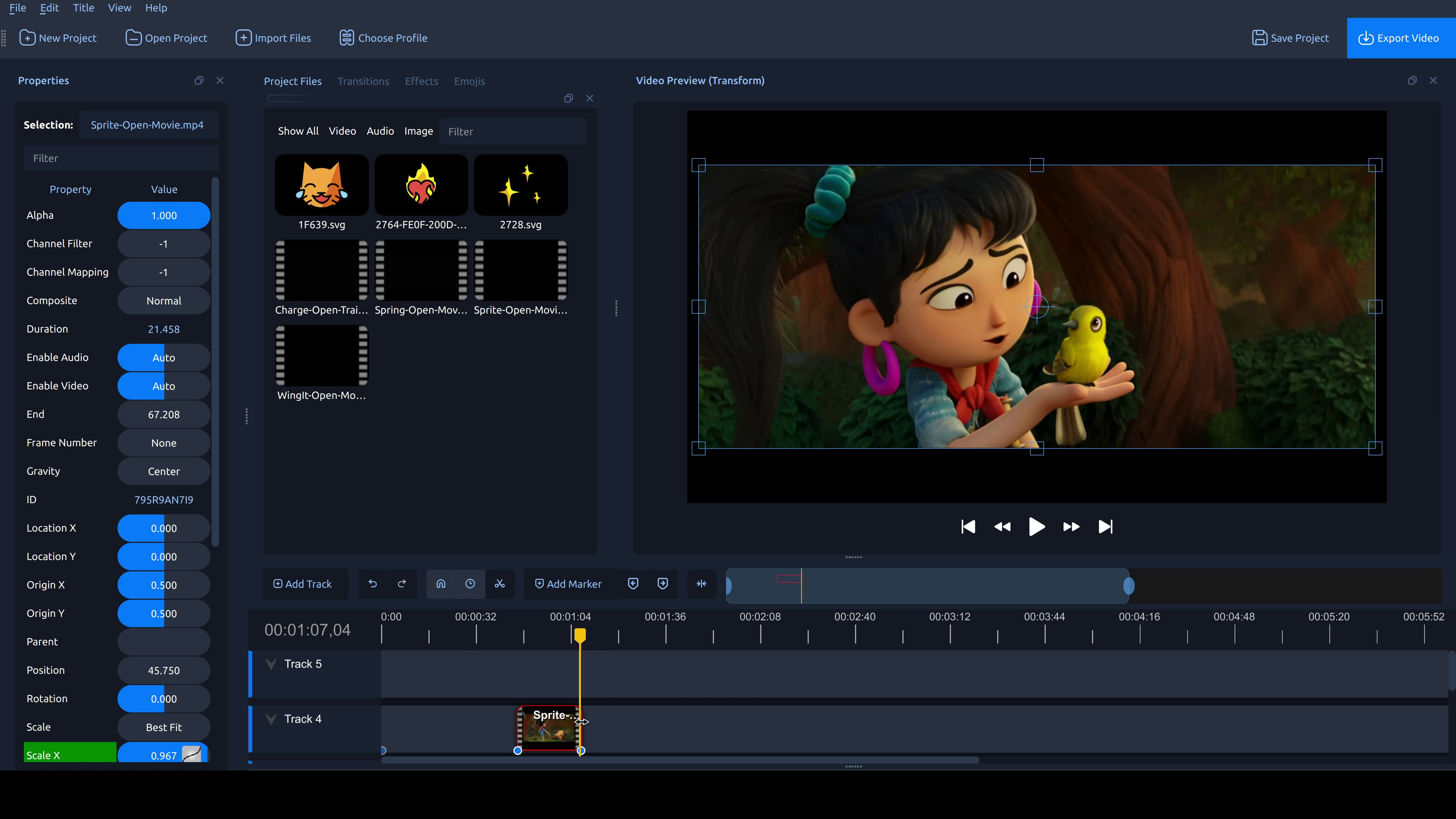
Zaczynamy! OpenShot 3.4 jest już dostępny i to jedna z naszych największych aktualizacji. Ogólne przyspieszenie wydajności o 32%, mniejsze zużycie pamięci, wiele nowych efektów wideo i funkcji, naprawione liczne błędy i awarie oraz eksperymentalna oś czasu dla odważnych, którzy chcą przetestować przyszłość OpenShot! Pobierz OpenShot 3.2.1 teraz!
Ten wpis jest dostępny tylko w języku angielskim.
Top highlights
- Big speed-up across the board: ~32% faster overall in internal benchmarks (197,011 → 133,239 “lower is better”).
- New Effects:
- Sharpen (detail enhancement; includes High Pass mode)
- Color Map (LUT) (color grading via
.cubeLUT files; supports 1D & 3D LUTs) - Spherical Projection (flatten/convert 360°/180° footage; fisheye options + improved quality)
- Lens Flare (classic flare look; based on FlareFX-style filter)
- Outline (edge/line styling with improved antialiasing)
Performance improvements
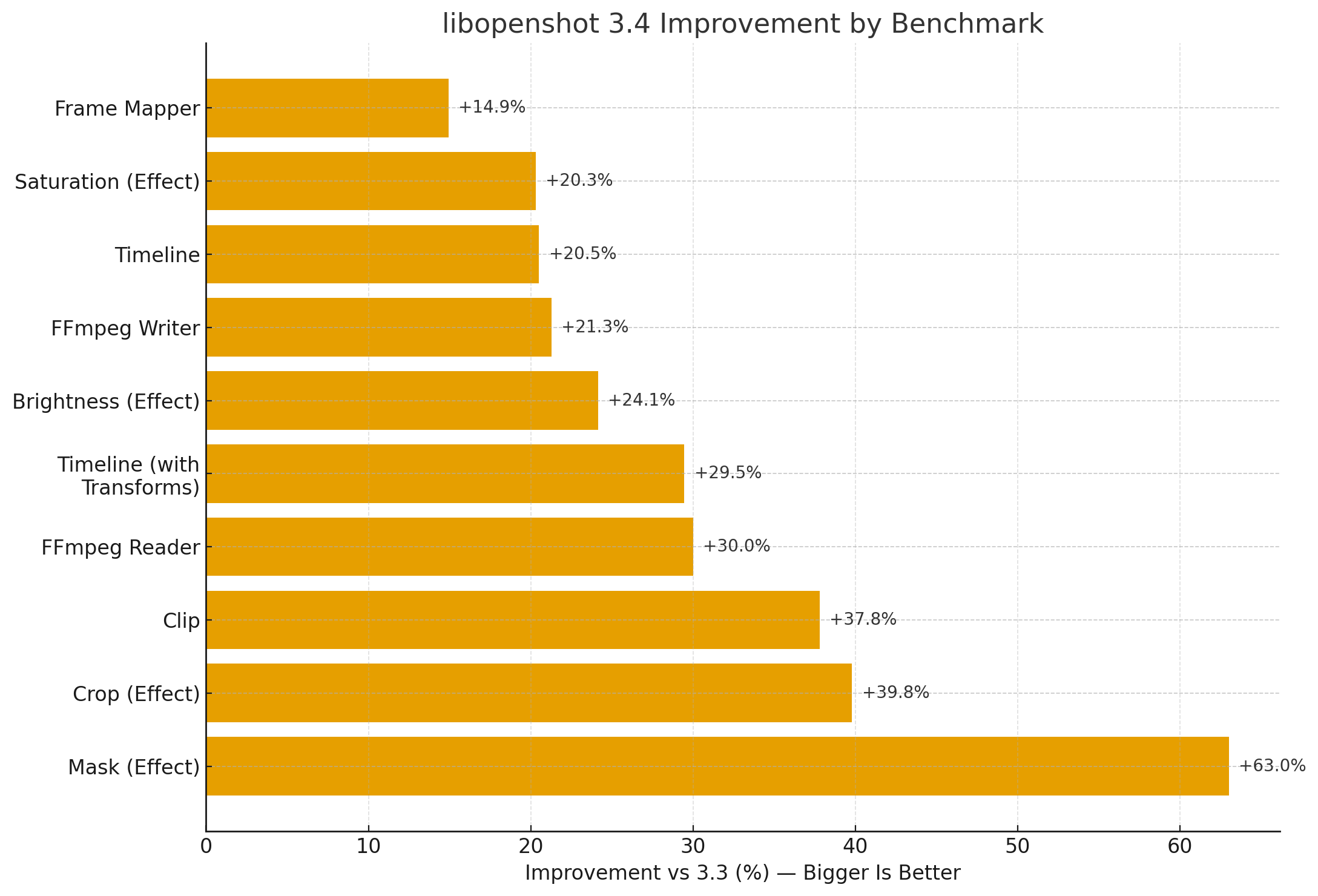
- Faster libopenshot core (benchmarks vs prior release; bigger is better):
- Mask effect: +63%
- Crop effect: +39.8%
- Clip rendering: +37.8%
- FFmpeg Reader: +30.0%
- Timeline (with transforms): +29.5%
- Brightness: +24.1%
- FFmpeg Writer: +21.3%
- Timeline: +20.5%
- Saturation: +20.3%
- Frame Mapper: +14.9%
- Faster exports (~23% improvement) by integrating the caching thread into the Export dialog (reduces CPU contention and improves throughput).
- Faster waveforms for long audio + time-curved clips (less decoding work; better handling during timeline edits).
- Faster FFmpeg decoding (aligned buffers / SIMD-friendly handling).
Cropping (interactive)
Demo: Interactive cropping in the preview!
- Interactive Crop handles in the video preview (crop what you see, directly on the canvas).
- Crop context menu + improved crop/transform handle synchronization (better origin handling, fewer surprises when resizing).
Timing Mode (drag to re-time)
- Timing toggle button (re-time by dragging clip edges, similar to trimming).
- More consistent frame-accurate behavior while re-timing (project FPS precision).
Keyframes & snapping
Demo: Dragging keyframes is now super easy!
- Draggable keyframes on the timeline (with live preview while dragging).
- Snapping improvements:
- Keyframes participate in snapping targets (especially during trims)
- Better snap tolerance during trims/re-timing
- Avoid “snap to self” edge cases (prevents odd lock-ups)
Experimental Timeline (Preferences → Experimental)
Demo: The Experimental Timeline in action!
Experimental Timeline can be enabled in Preferences → Experimental. It’s the bleeding-edge direction of OpenShot’s timeline and may still have rough edges.
Unstable / use at your own risk.
- Smoother scrolling/zooming on large timelines (reduced geometry rebuilds).
- Markers, waveforms, keyframe rendering, improved snapping, and more track visuals.
- Thumbnail handling improvements for trimming and preview reliability.
- New Keyframe panel and in-timeline keyframe editing
Editing & workflow
- Repeat / Loop / Ping-Pong options added to the Time context menu (supports trims + Timing mode).
- Multi-selection editing improvements:
- Transform multiple clips together (location/scale/rotation/skew, etc.)
- Property dock supports multi-select navigation (jump between selected items cleanly)
- Copy/Paste files into Project Files from the OS clipboard (assets auto-saved into the project asset folder).
Import / Export compatibility
- Final Cut Pro XML (v4/v5 xmeml) improvements:
- Better spec compliance (DTD support; cleaned up nonstandard attributes)
- Improved import order (video tracks first, audio tracks after)
- Motion + keyframes round-trip (trim, alpha, volume, position, scale, rotation — with some limitations)
- EDL import/export improved (more standards-friendly, plus OpenShot details as comments).
- Timecode alignment updated to match common standards (00:00:00:00 framing behavior).
Media handling & accuracy
- Duration strategy modes in FFmpegReader (more consistent handling across tricky media).
- Stronger consistency between frame counts and durations (duration and
video_lengthnow match in meaning; unknown durations handled more predictably). - Animated GIF import via FFmpeg (supports animation + alpha; fixes duration/video_length accuracy).
- Better H.265 playback on Apple devices (adds
hvc1tagging where needed). - Audio direction fixes for reversed/time-curved clips (more reliable audio when time runs backward or changes direction).
Developer tools
- New Benchmark tool in libopenshot (easier performance testing and version comparisons).
Stability & reliability
- Undo/Redo reliability fixes (transaction grouping survives save/reload; fewer selection-related crashes).
- Crash prevention in common editing actions (deleting tracks/transitions, “Save Frame As…”, waveform extraction edge cases).
Packaging & platform support
- AppImage improvements to work better on newer distros (dependency fixes and environment hardening for modern Linux systems).
- Ongoing cross-platform maintenance across Linux/macOS/Windows (build and compatibility updates).
Infrastructure & automations
- SQS-based autoscaling build infrastructure (builders run only when needed; reduces ongoing infrastructure cost).
- Additional CI/release automation improvements (more reliable asset handling and deployment flow).
Credits, translations, and community
- Updated supporter credits and acknowledgements.
- Translation updates (many languages refreshed; more completed translations).
- Special thanks to Raffi for community support, testing, issue advocacy, and helping drive quality forward.