Introduction
OpenShot Video Editor is an award-winning, open-source video editor, available on Linux, macOS, Chrome OS, and Windows. OpenShot can create stunning videos, films, and animations with an easy-to-use interface and rich feature-set.
Features
Free & open-source (licensed under GPLv3)
Cross-platform (Linux, macOS, Chrome OS, and Windows)
Easy-to-use UI (beginner-friendly, built-in tutorial)
Supports most formats (video, audio, images - FFmpeg-based)
70+ export targets & profiles (YouTube, TikTok, Reels, Shorts, and more)
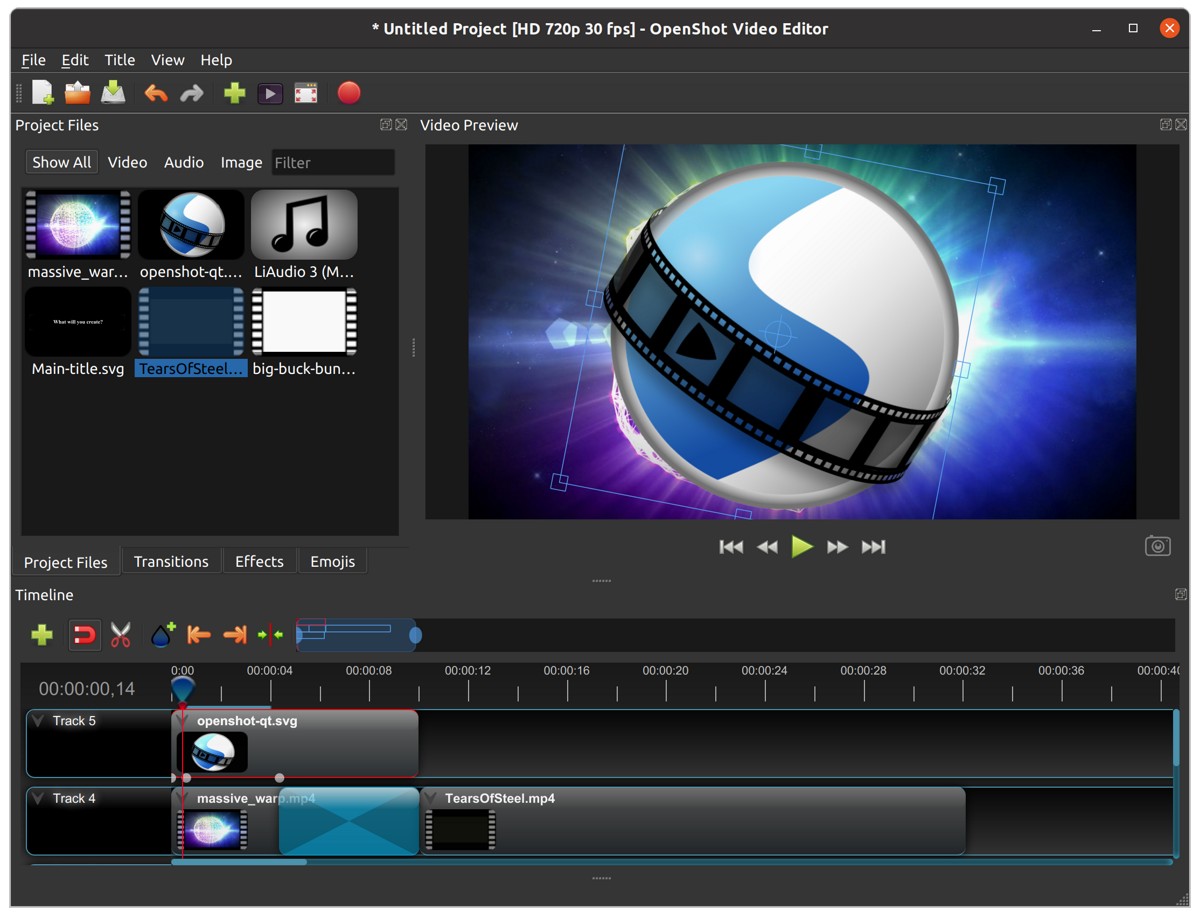
Advanced timeline (drag-drop, scroll, zoom, snap)
Advanced clips (trim, alpha, scale, rotate, shear, transform)
Real-time preview (multi-threaded, performance-optimized)
Multiple workspace modes (Simple and Color views, plus save your own)
Keyframe animations & panel (linear, bézier, constant interpolation, visual keyframe panel)
One-click presets (motion, fade, look, camera, color, and more)
Compositing, overlays, watermarks, transparency
Unlimited tracks / layers (for complex projects)
Transitions, masks, wipes (grayscale images, animated masks)
Video effects (chroma key, blur, brightness & contrast, film grain, stabilizer, and more)
Audio effects (compressor, expander, noise removal, echo, and more)
Color grading (color wheels, RGB curves, LUT support, video scopes & analysis)
Image sequences & 2D animations
Blender 3D integration (animated 3D title templates)
Vector file support & editing (SVG for titles, lower thirds, text overlays)
Audio mixing, waveform, editing
Emojis (open-source stickers & artwork)
Frame accuracy (per-frame navigation)
Time re-mapping & speed changes (slow motion, repeat, loop, ping-pong, forward/backward)
Built-in AI (motion tracking, object detection, stabilization)
Advanced AI (see Advanced AI: ComfyUI)
Tracking & masks (object tracking, animated mask generation, auto-blur, auto-highlight)
Image & video generation (text-to-image, image style transfer, text/image-to-video)
Quality enhancement (upscaling, frame interpolation/increase frame rate)
Analysis & automation (auto scene splitting, speech transcription/captions)
Audio generation (sound and music generation)
Additional workflows can be added with custom ComfyUI templates
Credits & captions (scrolling, animated)
Hardware acceleration (NVIDIA, AMD, Intel, etc.)
Import & export (EDL, Final Cut Pro)
Desktop integration (drag-drop from file managers)
JSON project format (OpenShot Cloud API compatible)
Customizable shortcuts
Translations (100+ languages)
High DPI monitor support
Community support (Visit our forum)
Screenshot
System Requirements
Video editing benefits from modern, multi-core CPUs with fast clock speeds (GHz), large amounts of memory, and fast hard disk drives. Basically, you want the best computer you can afford when video editing. Here are the minimum system requirements:
TL;DR
Most computers manufactured after 2017 will run OpenShot
Minimum Specifications
64-bit Operating System (Linux, macOS, Chrome OS, Windows 7/8/10/11)
- Multi-core processor with 64-bit support
Minimum cores: 2 (recommended: 6+ cores)
Minimum threads: 4 (recommended: 6+ threads)
Minimum turbo clock speed: 2.7 Ghz (recommended: 3.4+ Ghz)
4GB of RAM (16+ GB recommended)
1 GB of hard-disk space for installation & usage (recommended: 50+ GB available hard-disk space for media, videos, images, and storage)
Optional: Solid-state drive (SSD), if utilizing disk-caching add an additional 10GB of hard-disk space
For factors related to real-time previews, see Playback.
License
OpenShot Video Editor is free software: you can redistribute it and/or modify it under the terms of the GNU General Public License as published by the Free Software Foundation, either version 3 of the License, or (at your option) any later version.
OpenShot Video Editor is distributed in the hope that it will be useful, but WITHOUT ANY WARRANTY; without even the implied warranty of MERCHANTABILITY or FITNESS FOR A PARTICULAR PURPOSE. See the GNU General Public License for more details.